iPad vs. Laptop for Students: Which Tech Essential Do You Really Need for School?
Choosing a device for school or university is no longer as simple as buying the most powerful laptop you can afford. Students now have more choices, including traditional laptops, tablets with keyboards, and 2-in-1 devices that sit somewhere in between.
For many students, the decision comes down to one question: Is an iPad enough, or do you actually need a laptop?
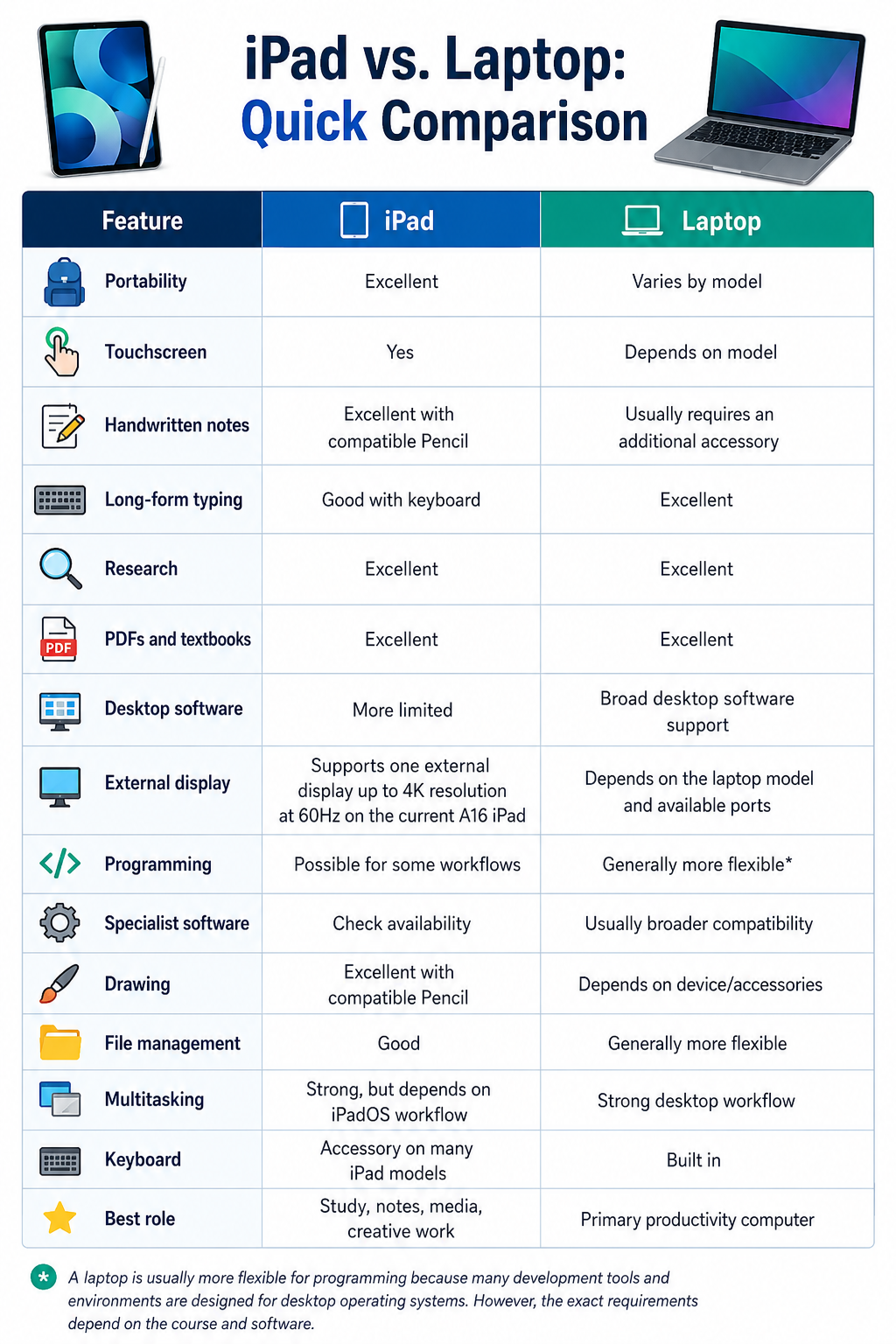
The answer depends on what you study, how you work, and which applications you need. An iPad can be excellent for reading, handwritten notes, presentations, research and creative work. A laptop is generally better when your studies involve extensive typing, desktop software, file management, programming or applications designed specifically for Windows or macOS.
At Chips, students in Kuwait can choose from Apple iPads, MacBooks, Microsoft Surface devices and other tablets and laptops.
So rather than asking which device is universally better, let's look at what each device actually does well.
iPad vs. Laptop: What's the Main Difference?
The simplest distinction is this:
An iPad is a tablet designed around touch interaction that can support keyboard, trackpad and other accessories for more laptop-like workflows. A conventional laptop is designed around a built-in keyboard, trackpad and desktop operating system.
That difference affects how you study.
An iPad gives you a touchscreen interface, easy portability and compatibility with Apple Pencil on supported models. You can read PDFs, annotate documents, take handwritten notes, watch lectures, browse the web and use educational apps from one lightweight device. The A16 iPad is rated by Apple for up to 10 hours of web surfing on Wi-Fi or video playback.
A laptop gives you a physical keyboard, trackpad, desktop operating system and access to software designed for a conventional computer. That can become important when you need to write long assignments, work with complex spreadsheets, run specialist software or manage lots of files and browser tabs.
Neither approach is automatically better.
The right choice depends on your workload.
Why Students Choose an iPad?
The iPad has become particularly useful for students because it combines several functions in a portable format.
For example, the current iPad 11-inch with the A16 chip weighs 477g in its Wi-Fi configuration. It has an 11-inch Liquid Retina display with a 2360 × 1640 resolution, 500-nit brightness and support for Apple Pencil USB-C and Apple Pencil 1st generation.
That makes it well suited to activities such as:
- Reading digital textbooks
- Taking handwritten notes
- Annotating PDFs
- Watching recorded lectures
- Browsing research sources
- Creating presentations
- Joining online classes
- Drawing diagrams
- Using educational apps
- Carrying study material without a heavy bag
For students who spend a lot of time reading and writing by hand, the touchscreen can be a significant advantage.
Handwritten Notes Are One of the iPad's Biggest Advantages
A laptop is excellent for typing, but it isn't naturally designed for handwritten notes.
With a compatible Apple Pencil, an iPad can function more like a digital notebook. You can write equations, sketch diagrams, highlight PDFs and organise notes without carrying separate notebooks for every subject.
The exact Pencil compatibility depends on the iPad model. For example, Apple's current A16 iPad supports Apple Pencil (USB-C) and Apple Pencil (1st generation).
Higher-end iPads support Apple Pencil Pro. Apple's current comparison information shows that the iPad Air and iPad Pro support Apple Pencil Pro, while the standard iPad A16 supports Apple Pencil USB-C and Apple Pencil 1st generation.
That distinction matters when you're building a student setup.
Don't buy the Pencil first and assume it works with every iPad. Check compatibility with your exact model.
Where an iPad Can Fall Short?
An iPad can do a lot, but it isn't necessarily a replacement for a laptop for every student.
The biggest limitation is usually software and workflow.
If your course requires a desktop application that is available for Windows or macOS but not iPadOS, an iPad may not be enough.
This can matter for students studying:
- Engineering
- Architecture
- Computer science
- Data science
- Advanced business applications
- Certain design disciplines
- Other courses requiring specialist desktop software
You should check your university's software requirements before choosing a tablet as your only computer.
There's another practical consideration: long-form typing.
You can connect a keyboard to an iPad, and Apple's current iPad range supports different keyboard accessories depending on the model. The standard A16 iPad, for example, supports the Magic Keyboard Folio.
But once you add a keyboard, the setup becomes closer to a laptop in both functionality and cost.
For students who spend hours writing essays, reports or code every day, a conventional laptop keyboard may still be the more natural choice.
Why a Laptop Still Makes Sense for Students?
A laptop remains the safer all-round choice if you need your device to handle everything from research and assignments to specialist software.
A traditional laptop gives you:
- A built-in keyboard
- A physical trackpad
- Desktop operating system
- Broader desktop software compatibility
- More conventional multitasking
- Easier file management
- External monitor support
- A familiar setup for long-form writing
For example, Apple's current MacBook range at Chips includes the MacBook Neo, MacBook Air and MacBook Pro, giving students different performance levels and form factors to choose from.
Microsoft Surface provides another approach. Surface Pro devices combine Windows with a touchscreen and detachable keyboard, giving students some of the flexibility of a tablet while retaining the Windows environment.
Microsoft's Surface Pro 8, for example, has a 13-inch PixelSense Flow touchscreen, 3:2 aspect ratio, 2880 × 1920 resolution and support for configurations with 8GB, 16GB or 32GB RAM. The i5 configuration uses an 11th-generation Intel Core i5-1135G7 processor.
This type of device can be particularly interesting for students who want Windows software plus touchscreen and pen functionality.
iPad vs. Laptop for Note-Taking
If note-taking is your priority, the iPad has an obvious advantage.
You can type when necessary and switch to handwriting when you need to:
- Draw a diagram
- Solve an equation
- Annotate a lecture slide
- Highlight a textbook
- Sketch a concept
- Write quick notes
A laptop is still perfectly capable of handling typed notes, but handwritten input generally requires an additional drawing tablet or other peripheral.
If you're a student who combines handwritten equations with typed explanations, an iPad with a compatible Pencil and keyboard can offer a useful middle ground.
iPad vs. Laptop for Research and Assignments
For basic research, both can work well.
An iPad can comfortably handle web browsing, PDFs, online learning platforms, email and document applications. The current A16 iPad includes Wi-Fi 6 and USB-C connectivity, while its 11-inch display provides a reasonable amount of space for reading and browsing.
However, research-heavy university work can become easier on a laptop if you regularly work with:
- Multiple browser windows
- Several documents
- Large spreadsheets
- Reference managers
- Desktop applications
- Extensive file folders
- Long academic papers
A laptop's traditional desktop interface can make these workflows more straightforward.
iPad vs. Laptop for Creative Students
This one is more complicated.
An iPad can be excellent for illustration, handwritten design work, photo editing, visual note-taking and other touch-based creative tasks.
The iPad Air and iPad Pro are particularly powerful options. Apple's current comparison lists the iPad Pro with the M5 chip, while the iPad Air is available with Apple's M4 chip. The iPad Pro also supports Apple Pencil Pro and has a more advanced display and Thunderbolt/USB 4 connectivity.
The standard iPad A16 is aimed at a different level of use.
So if you're a design student, don't simply ask:
"Is an iPad good for design?"
Ask:
"Which iPad, which software and which accessories do I need for my course?"
For professional or advanced creative workflows, a MacBook or desktop computer may still be necessary depending on the applications required.
iPad vs. Laptop for Engineering and Computer Science
This is where we would be particularly cautious about recommending an iPad as a student's only computer.
Engineering and computer science courses can require specialised software, development environments or tools that aren't available in the same form on iPadOS.
That doesn't make an iPad useless.
In fact, it can be excellent as a secondary study device for:
- Reading lecture notes
- Annotating diagrams
- Watching tutorials
- Taking handwritten mathematical notes
- Reviewing code
- Reading technical papers
But if your course requires desktop development tools or engineering applications, a laptop may need to remain your primary machine.
For specialist technical courses: Check software requirements first
This is more important than comparing processor names.
What About Storage?
Storage requirements depend on what you store locally.
The current A16 iPad comes in 128GB, 256GB and 512GB configurations.
For students who mainly store:
- Notes
- PDFs
- Documents
- Presentations
- Cloud-based files
For students who mainly store notes, documents and PDFs and rely on cloud storage, 128GB may be sufficient. Students who keep large media or project files locally should consider more storage.
Students who keep lots of:
- Video
- Photography
- Large design files
- Offline media
- Game installations
- Large project files
may benefit from more storage.
The same principle applies to laptops.
Don't buy storage based only on what you need today. Think about what you will accumulate over your entire course.
What About Portability?
An iPad can have a portability advantage, particularly when you use it without a keyboard. The current 11-inch A16 iPad weighs 477g for the Wi-Fi model.
That makes it easy to carry between:
- Classes
- Libraries
- Home
- Cafés
- Study groups
However, remember that an iPad isn't always your complete setup.
If you add a keyboard, Pencil, case and charger, the total weight increases.
A lightweight laptop, meanwhile, gives you the keyboard and trackpad as part of the main device.
So, compare the complete setup, not just the tablet itself.
What About a 2-in-1 Like Surface Pro?
There is a third option worth considering: a 2-in-1 Windows device.
Surface Pro combines a touchscreen tablet design with Windows. With a compatible keyboard, it can function much more like a laptop, while the touchscreen and pen support provide tablet-style flexibility.
For students who want:
Windows + touchscreen + detachable keyboard + pen support
a Surface Pro can be an attractive compromise.
Microsoft's Surface Pro 8 supports touch, a detachable keyboard and Surface Slim Pen 2, depending on the accessories and configuration.
Chips currently lists Surface products as well as Apple devices, so students can compare different approaches rather than limiting themselves to one ecosystem.
What About Huawei MatePad?
Students who are open to alternatives beyond Apple and Microsoft can also consider Huawei MatePad.
Chips currently lists several MatePad models, including the Huawei MatePad 11.5 S 2026, MatePad 12 X 2025, MatePad 11.5, and MatePad Mini models. Some listings include a keyboard and pen, making them particularly relevant to students looking for a tablet-based study setup.
For example, the current Chips listing for the MatePad 11.5 S 2026 specifies 12GB RAM and 256GB storage, with an English keyboard and pen included.
That's worth considering if your priority is digital note-taking, reading, portability and tablet-style study.
However, just as with an iPad, students should check whether the apps and services required by their school or university are supported before choosing a tablet as their only computer.
So, Do You Really Need Both?
Not necessarily.
For some students, an iPad can be their main study device.
For others, a laptop is essential.
And for some, having both makes sense.
Choose an iPad as your primary device if:
- You mainly read and annotate PDFs
- You prefer handwritten notes
- Your coursework relies on web and mobile apps
- You want maximum portability
- You don't need specialist desktop software
- You do a lot of drawing or visual work
Choose a laptop as your primary device if:
- You write long assignments regularly
- You use desktop software
- You study engineering or computer science
- You need extensive file management
- You multitask heavily
- You want one device that handles conventional computer workloads
Consider both if:
You already have access to a capable laptop but want a lighter device for notes, textbooks and lectures.
That combination can be particularly useful because the devices serve different purposes rather than simply duplicating each other.
What Should Parents Look for When Buying a Student Device?
If you're buying a device for a school or university student, specifications aren't the only things that matter.
1. Course requirements: This should come first. Check the school's or university's required operating system and software.
2. Keyboard: If the student writes lengthy assignments, don't underestimate the value of a comfortable physical keyboard.
3. Pen support: For subjects that involve diagrams, equations, annotation or handwritten work (such as mathematics, engineering, medicine and design), pen support can be particularly useful.
4. Storage: Think about the entire course rather than the first semester.
5. Portability: A device that is technically powerful but too heavy to carry every day may end up staying at home.
6. Accessories: Remember to budget for the complete setup:
Device + keyboard + Pencil/pen + case + charger
An iPad's headline price doesn't necessarily represent the price of a complete laptop-style setup.
Our Verdict: iPad or Laptop?
There isn't a universal winner.
If your priority is handwritten notes, reading, portability and touch-based study, an iPad can be an excellent student device.
If your priority is typing, desktop applications, programming, complex multitasking and specialist academic software, a laptop is usually the safer primary choice.
And if you want the flexibility of Windows with a touchscreen and detachable keyboard, a device such as Surface Pro sits between the two.
At Chips, we believe the best student technology is the one that fits the student's actual course requirements and study habits, rather than simply having the highest specification.
Explore the latest iPads, tablets, MacBooks and laptops at Chips Kuwait and compare the devices and accessories available for your study setup. Chips iPads & Tablets
Frequently Asked Questions
Is an iPad enough for school?
For many students, yes. An iPad can handle reading, web research, note-taking, presentations, video lessons and educational applications. However, students whose courses require desktop-only software may still need a laptop.
Is an iPad better than a laptop for students?
Neither is universally better. An iPad is particularly strong for handwritten notes, portability, reading and touch-based work. A laptop is generally better for long-form typing, desktop applications, programming and complex multitasking.
Can an iPad replace a laptop for university?
It can for some students, particularly when their coursework primarily uses browser-based or iPadOS applications. Before making an iPad your only computer, check whether your course requires Windows or macOS software.
Is an iPad good for taking notes in school?
Yes. With a compatible Apple Pencil, students can write notes by hand, annotate PDFs, draw diagrams and organise digital study material. The exact Apple Pencil model supported depends on the iPad. Apple's current A16 iPad supports Apple Pencil USB-C and Apple Pencil 1st generation.
Which iPad is best for students?
It depends on the workload. The standard A16 iPad is suitable for many everyday school and study tasks. Students who want more performance or advanced creative capabilities can consider the iPad Air or iPad Pro. Apple's current lineup includes the A16 iPad, M4 iPad Air and M5 iPad Pro.
Do I need an Apple Pencil for school?
Not necessarily. An Apple Pencil is most useful if you want to handwrite notes, annotate PDFs, draw diagrams or sketch. Students who primarily type assignments may not need one.
Can Surface Pro be used as both a laptop and tablet?
Yes. Surface Pro is designed as a Windows 2-in-1 device with a touchscreen and detachable keyboard support. The Surface Pro 8, for example, has a 13-inch touchscreen and supports Surface Slim Pen 2.
Is 128GB enough for a student iPad?
It can be enough for students who mainly use cloud storage and keep relatively few large files locally. Students who store lots of videos, photos, design projects or other large files should consider more storage. The current A16 iPad is available in 128GB, 256GB and 512GB capacities.
Should students buy an iPad and a laptop?
Not always. If the student already has a capable laptop, an iPad can be a useful secondary device for handwritten notes, textbooks and lectures. If the student needs only one device, choosing between them should come down primarily to course software, typing requirements and study habits.