Best Lightning Cables For iPhone
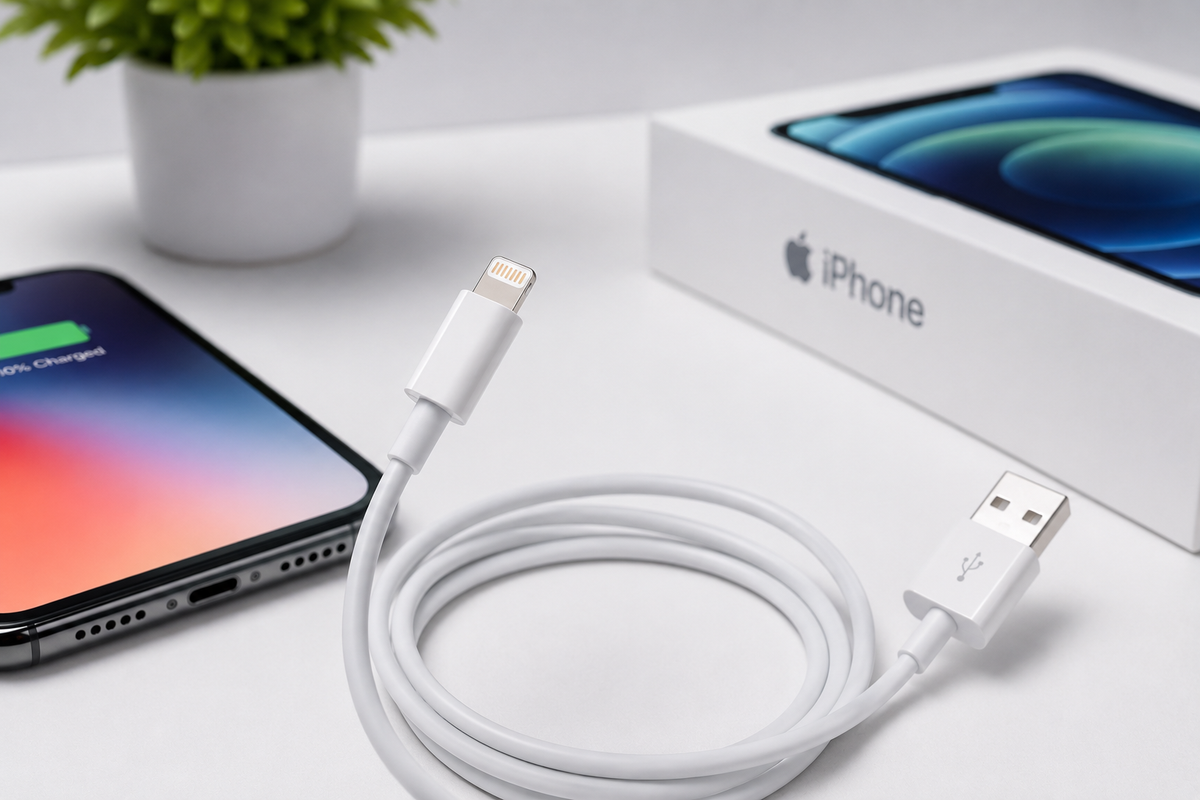
If you’re still using an iPhone with a Lightning port, your charging cable is something you rely on every day. But in 2026, not all Lightning cables are the same.
Choosing the right cable is not just about what fits your phone. It also affects how safely and efficiently your device charges. A low-quality cable can cause issues like “Accessory Not Supported” errors, overheating, or even damage to your phone’s internal charging system.
That’s why it’s important to pick a cable that is reliable, safe, and built to last.
In this guide, we’ll help you find the best Lightning cables for iPhone in 2026, based on durability, performance, and real-world use.
1. The Gold Standard: Apple Official Cables
When it comes to perfect compatibility and reliability, Apple’s own Lightning cables are still one of the safest choices.
Earlier versions had issues with fraying, but the newer cables in 2026 are more durable and better built.
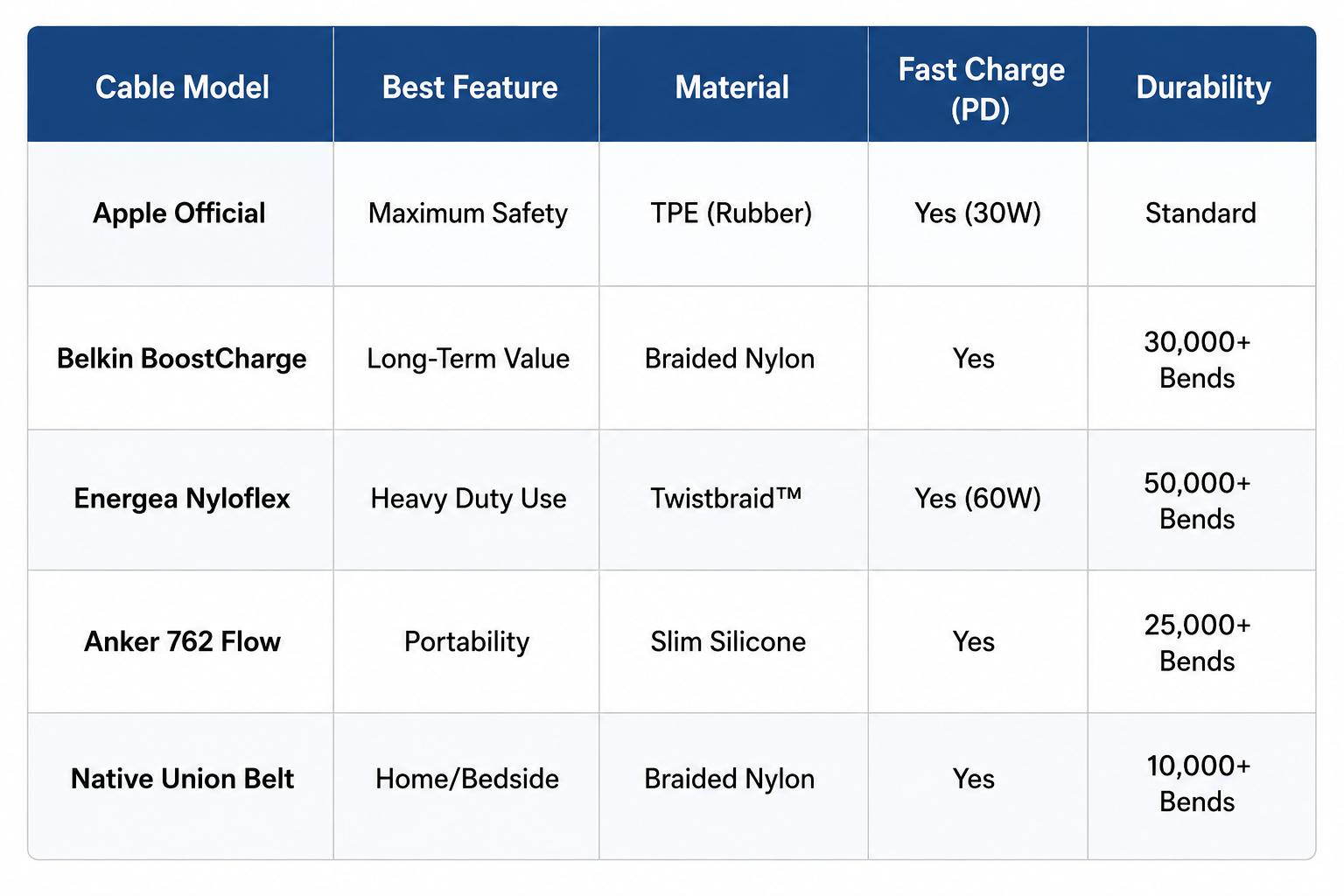
Apple USB-C to Lightning Cable: This is the best option if you want fast charging. It works with 18W, 20W, or 30W adapters and can charge an iPhone from 0% to 50% in about 30 minutes.
It includes Apple’s official authentication chip, which allows proper communication between the charger and your phone. This helps ensure safe charging, stable performance, and better long-term battery health.
2. Best for Durability: Belkin BoostCharge
If your cables usually break near the ends, the Belkin BoostCharge series is built to last.
Belkin BoostCharge Braided USB-C to Lightning Cable: This cable uses a strong double-braided nylon design, making it much tougher than regular rubber cables. In testing, it handled over 30,000 bends, which is far more than standard cables.
It is MFi-certified (Made for iPhone), so it works safely with your device. It also has a reinforced design inside, which helps prevent damage from pulling, bending, or daily use. If durability is your top concern and you want a cable that won’t wear out quickly, this is one of the most reliable options available.
3. High-Performance Alternatives
For users in the Middle East and international markets, brands like Energea and Anker have introduced specialized cables that solve unique problems, such as cable length or multi-device charging.
The Best Specialized Lightning Cables (2026)
a. Energea Nyloflex: This is a powerhouse of durability. Designed with Twistbraid™ technology and medical-grade silicone, it remains incredibly soft to the touch while being virtually impossible to snap. It’s been tested to endure a 50KG pull test, making it one of the toughest Lightning cables on the market.
b. Anker 762 (PowerLine III Flow): If you hate bulky cords, this is the one for you. Anker has managed to shrink the internal layout to create an ultra-slim profile without sacrificing speed. Despite its thin design, it fully supports Power Delivery (PD), meaning it can fast-charge your iPhone 14 Pro Max at its top speed.
c. Native Union Belt Cable XL: For those who need to charge while relaxing on the sofa or working across a large desk, this 10ft (3-meter) cable is perfect. It’s crafted with reinforced nylon braiding and comes with a genuine leather strap to keep the extra length neatly coiled when you aren't using it.
Comparing All Options of iPhone Lightning Cables
The Critical Checklist: What to Look For
When you’re standing in a shop or browsing online, choosing the right cable can feel confusing. But if you focus on a few key things, you can avoid wasting money and protect your iPhone.
a. MFi Certification: Your Safety Check
The most important thing to look for is the MFi (Made for iPhone) label from Apple. This means the cable is approved to work safely with your device. MFi cables have a small chip inside that controls power and prevents damage. Cheap cables without this chip can cause errors like “Accessory Not Supported” or even harm your phone’s charging system, which is expensive to repair.
b. Connection Type: USB-C vs USB-A
The end of the cable that plugs into your charger affects speed. A USB-C to Lightning cable is the best choice for fast charging and can charge your phone up to 50% in about 30 minutes with the right adapter. USB-A to Lightning cables are older and slower, making them better for basic or overnight charging.
c. Cable Material: Pick Based on Use
The outer material affects how long your cable lasts. Rubber (TPE) cables are light and flexible but can crack or discolor over time. Nylon braided cables are stronger and better for daily wear and travel. Silicone cables are the softest and most flexible, making them ideal for home use, especially near your bed.
The Takeaway
If your top priority is safety and perfect compatibility, the Apple USB-C to Lightning cable is the best choice. It follows Apple’s exact standards and ensures stable, reliable charging every time. Otherwise you can look for alternatives mentioned above.
A good cable is not just about price. Choosing the right type, certification, and material can improve charging speed, safety, and how long the cable lasts.
If you’re in Kuwait and looking for the latest iPhone gear, Chips is a premier destination for high-quality electronics and accessories. Whether you need a lightning-fast charger for an iPhone 14 or the newest USB-C setup for the iPhone 17 series, Chips offers a curated selection of reputable brands and official Apple products.
We stock top-tier brands like Energea, Engage, and Anker, alongside official Apple hardware. Moreover, many items qualify for extended warranties and protection plans covering accidental damage and voltage spikes. Shop now!
Frequently Asked Questions
1. Why does my cable only charge when plugged in on one side?
Lightning cables are designed to work both ways, but sometimes one side stops working. This usually happens because of dirt or buildup on the metal contacts or lint stuck inside the charging port. You can fix this by gently cleaning the cable tips with a soft cloth and a little isopropyl alcohol. If needed, carefully remove any lint from the port using a wooden toothpick.
2. Can I use my Lightning cable to transfer files to a computer?
Yes, you can use an MFi-certified cable from Apple or other trusted brands to transfer data between your iPhone and a computer. Lightning cables support standard data transfer, which is fast enough for photos and backups. However, it will feel slower if you are moving large files like high-resolution videos.
3. How do I safely clean my iPhone’s charging port?
If your cable feels loose or does not click in properly, the port may have dust or lint inside. Turn off your phone first, then gently clean the port using a wooden or plastic toothpick. Avoid using anything metal, as it can damage the internal parts.
4. Why does my phone get warm while fast charging?
Fast charging pushes more power into your phone in a short time, which naturally creates some heat. This is normal when using a USB-C to Lightning cable. As long as you are using a certified cable like those from Belkin, your phone will manage the temperature and slow down charging if it gets too warm.
5. Will a software update stop my cable from working?
This can happen with low-quality or uncertified cables. Software updates may block cables that do not meet safety standards. To avoid this, it is best to use MFi-certified cables from reliable brands like Anker so your cable continues to work properly over time.